HUD
What the numbers mean
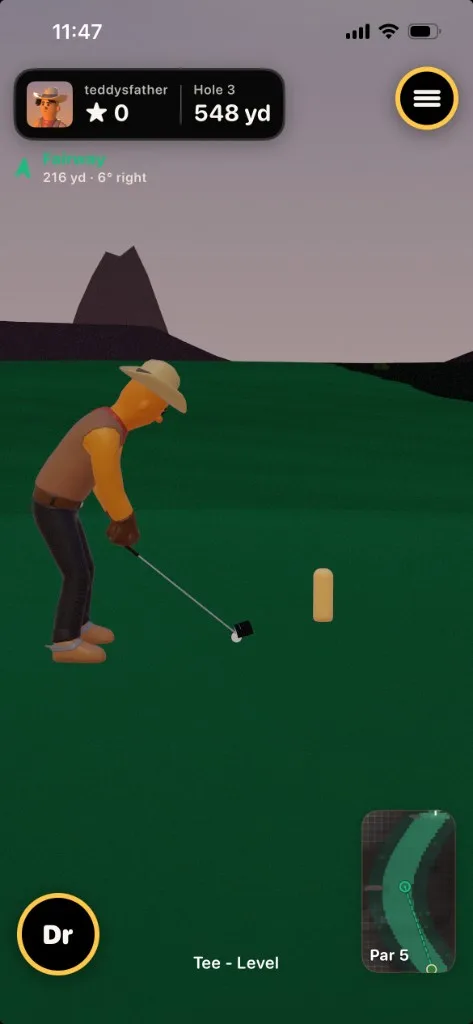
Top-left info pill
Tap it to open the scorecard.
- Player name: whose turn.
- Score: running points with Simplified scoring, to-par (E / +n / −n) with Classic scoring, or a practice shot count on the Range.
- Yards: distance to the pin, or to the range target.
- Hole: H3 · Par 4, or Driving, Chipping, or Putting on the Practice Range.
Projection chip: before you strike
- Headline: projected settle, shown as a surface name, “In the cup”, or “Aiming…”
- Detail: carry yards and straight / N° left / N° right.
- Needle color: green is a safe lie, gold is caution (rough or hardpan), red is hazard.
- Needle rotation: aim offset from the pin.
Shot distance chip: after you strike
Gold. In flight it shows live total yards. After the ball lands: Carry X yd · Total Y yd.
Lie chip
Bottom of the screen, off the green. Surface plus slope, for example Fairway · ↓4% →3. “Level” if the grade is under 2%. Arrows are along-shot up or down, then across-break left or right. On green or fringe this chip becomes the Read Green / Putt View button.
Everything else
- Club bag: current short label. Open the wheel for clubs and range captions.
- Flight spin dial: animated ball and vertical gauge. VoiceOver reads NO SPIN, BACK, or TOP.
- Camera motion: round button above the mini-map. Shows Follow or Still; tap to switch. Stays up through ball flight.
- Mini-map: top-down hole with fairway, green, bunkers, water, trees, plus ball and player markers.
- Shot review: Play on / Next ball above the golf bag (same slot as Rehit); Replay handle when replays were skipped.
- Practice banner and Address the Ball (solo and local play, not online matches); center celebration capsule (Birdie!, Par, and so on), with that hole’s points beneath it when Simplified scoring is selected; status coaching such as “Stand at 45° to camera”.
On TV, the score chrome lives on the set. The phone keeps a round play-style toggle in the top-left (tap it to switch Swipe and Motion between shots), a Flip camera disc when Motion is on (Calibrate lives in Input Settings), projection, lie, mini-map, bag, and the swing surface. The phone’s camera view goes dark while the ball is in the air and during celebrations so the TV picture stays smooth. AirPlay to TV uses a dedicated layout. It is not a video mirror of the phone.